WorkLog: Optimizing GEMM
This is my first blog post in a series about going under the hood of GPU Programming and implementing custom CUDA kernels and ways to optimize them. As a case study, I will employ various methods to optimize GEMM(GEneral Matrix-Matrix Multiplication). The custom CUDA kernels will be benchmarkerd against cuBLAS(NVIDIA's official BLAS library).
- GPU used: RTX3060
- CUDA version: 12.8
- Code is available at: Optimizing GEMM in CUDA
Background
GEMM: GEneral Matrix-to-Matrix Multiplication
where,
- , , are matrices(must be of same precision)
- , are scalars
For the purpose of this exercise, will be using
- and
- A, B, C are single-precision floats(4 bytes each).
Benchmark Setup
Matrix sizes:
- Rectangular Matrix
- ,
- ,
- Square Matrix
- sizes {64,128,256,512,1024,2048,4096,8192}.
- Rectangular Matrix
Input Data: Initialized with random values
For pure performance benchmarking,
- reusing the exact values is not necessary
- only the matrix dimensions matter, as long as the values remain within a reasonable numeric range.
Before diving into kernel implementations, let's have an insight into two key topics:
Compute-bound v/s Memory Bound
| Compute-bound | Memory-bound |
|---|---|
| GPU spends most of its time performing arithmetic operations |
GPU spends most of its time waiting for data from global memory / VRAM
|
Performance is limited by how fast GPU cores can compute FLOPs
|
Performance is limited by memory bandwidth |
Arithmetic Intensity(AI)
Measures how many floating-point operations are performed per byte of memory transferred. In other words,
For SGEMM(Single-Precision GEMM)
a) Total FLOPs
b) Total bytes accessed
- Read A: bytes
- Read B: bytes
- Read/write C: bytes(read + write)
Total Memory traffic
c) Theoretical AI for SGEMM(Single-Precision GEMM)
Note: Each benchmark is measured over 10 runs after a warm-up phase to minimize the impact of GPU frequency scaling, system scheduling, CUDA runtime overhead, and cache effects.Timing is performed using CUDA events to measure kernel execution time on the device.Individual run times may fluctuate due to these factors, so we report the minimum execution time rather than the average.
The minimum time represents the run with the least system interference, providing a clearer estimate of the kernel’s true performance potential.
Benchmark: cuBLAS implementation
cublasHandle_t handle;
CUBLAS_CHECK(cublasCreate(&handle));

CUBLAS_CHECK(cublasSgemm(
            handle,
            CUBLAS_OP_N, CUBLAS_OP_N,
            N, M, K,
            &alpha,
            d_B, N,
            d_A, K,
            &beta,
            d_C, M
        ));
- cuBLAS assumes matrices as column-major order, whereas our matrices are stored in row-major order.
- To account for this difference,
- Swapped matrix A and B in the cuBLAS call.
- Allows the operation to produce the same result as a row-major multiplication.
- Both matrices are passed with the
CUBLAS_OP_Nflag, indicating that no transposition should be applied during the operation.
Note: cuBLAS also provides a transpose flag: CUBLAS_OP_T, which allows to treat inputs as transposed. In principle, this can be used to avoid explicitly transposing the matrix before call. However, for the purpose of our exercise, I have used explicit transposition to keep things straightforward and will revisit CUBLAS_OP_T in a future article.
Kernel 1: Using Naive Method
In the first approach,
- each CUDA thread computes one element of the output matric C.
- Specifically, a thread computes the dot product of the corresponding row of A with corresponding column of B.
- In other words, from a single-thread perspective, kernel performs the full dot product required to compute one output element.
In other words, the kernel does
__global__ void GEMM(const float* A, const float* B, float* C, int M, int N, int K, float alpha, float beta){
    int row = threadIdx.y + blockDim.y * blockIdx.y;
    int col = threadIdx.x + blockDim.x * blockIdx.x;
    if(row < M && col < N){
        float temp = 0;
        for(int i = 0; i < K; i++){
            temp += A[row*K + i] * B[i*N + col];
        }
        C[row*N + col] = alpha * temp + beta* C[row*N + col];
    }
}
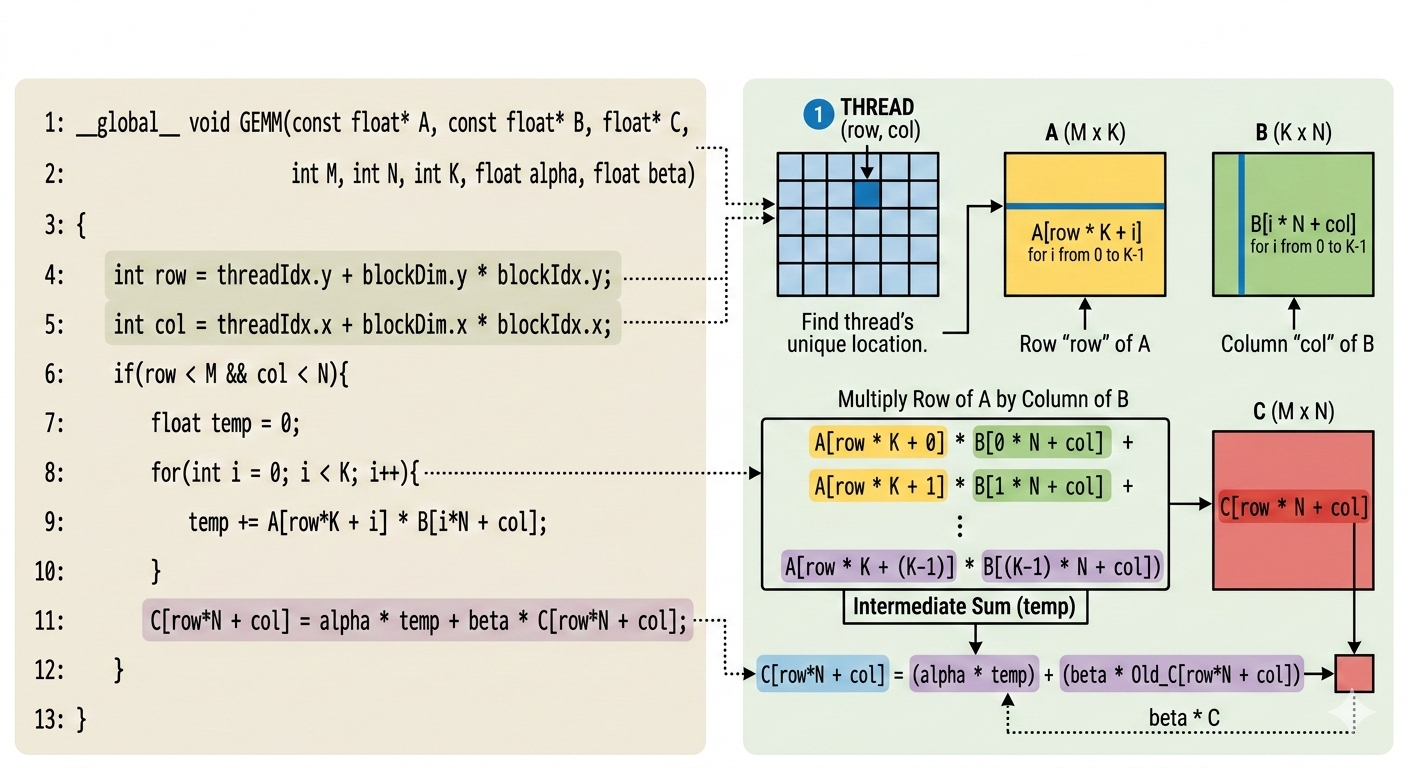
The above implementation is highly inefficient on modern GPUs because it is memory-bound rather than compute-bound.
- Each thread repeatedly loads elements of matrices A and B from global memory for each iteration of the inner loop, even though many of these values are reused by neighbouring threads.
- Since global memory accesses are orders of magnitude slower than on-chip memory, GPU spends more time waiting for data instead of performing arithmetic operations.
- As a result, the arithmetic units remain underutilized, and the overall performance becomes limited by memory bandwidth rather than computational throughput.
Kernel 2: Shared Memory & Tiling
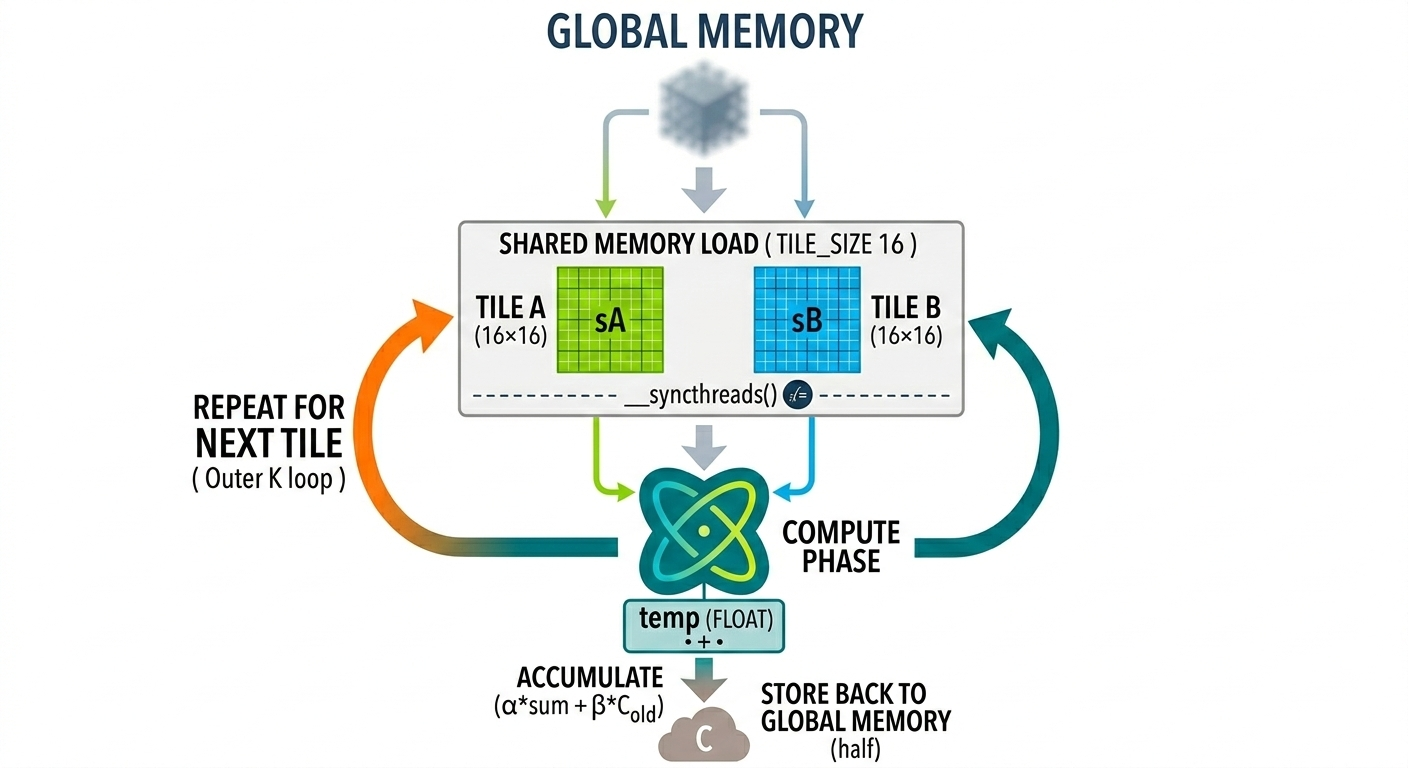
- This kernel approach uses shared-memory tiling to reduce redundant global memory accesses.
- Each thread block loads a tile of matrices 𝐴 and 𝐵 from global memory into shared memory.
- These tiles are loaded once per thread block and reused by all threads within the block.
- Each thread computes partial dot products using the data stored in shared memory.
- The process then repeats for the next tile along the 𝐾-dimension.
- Each thread still computes one output element, but shared-memory reuse significantly reduces global memory accesses and improves performance.
__global__ void GEMM(const float* A, const float* B, float* C, int M, int N, int K, float alpha, float beta){
    int row = threadIdx.y + blockDim.y * blockIdx.y;
    int col = threadIdx.x + blockDim.x * blockIdx.x;

    __shared__ float sA[TILE_SIZE][TILE_SIZE + 1];
    __shared__ float sB[TILE_SIZE][TILE_SIZE + 1];

    float temp = 0.0f;
    for(int i = 0;i < (K + TILE_SIZE - 1)/TILE_SIZE; i++)
    {
        // Load from tile A
        if(row < M && threadIdx.x + TILE_SIZE * i < K)
        {
            sA[threadIdx.y][threadIdx.x] = (A[row * K + threadIdx.x + TILE_SIZE*i]);
        }
        else{
            sA[threadIdx.y][threadIdx.x] = 0.0f;
        }

        if(col < N && threadIdx.y + TILE_SIZE * i < K)
        {
            sB[threadIdx.y][threadIdx.x] = (B[(threadIdx.y + TILE_SIZE * i)*N + col]);
        }
        else{
            sB[threadIdx.y][threadIdx.x] = 0.0f;
        }

        __syncthreads();

        #pragma unroll
        for(int j = 0;j < TILE_SIZE; j++)
        {
            temp += sA[threadIdx.y][j] * sB[j][threadIdx.x];
        }
        __syncthreads();

    }
    if(row < M && col < N){
        C[row*N + col] = (alpha * temp + beta* (C[row*N + col]));
    }

}
Kernel 3: 1D Thread Tiling
- In Kernel 2, each thread computed one output element of the matrix 𝐶.
- In this version, I increase the amount of work performed by each thread using 1D thread tiling. Instead of computing a single output element, each thread computes multiple consecutive elements along the row of 𝐶.
- This allows threads to reuse loaded data for several computations, increasing arithmetic intensity
Kernel implementation as follows:
#define THREAD_TILE 4 // 1 thread → computes 4 elements of C
__global__ void GEMM(const float* A, const float* B, float*C, int M, int N, int K, float alpha, float beta){
    int row = threadIdx.y + blockIdx.y * TILE_SIZE;
    int col = threadIdx.x * THREAD_TILE + blockIdx.x * TILE_SIZE;

    __shared__ float sA[TILE_SIZE][TILE_SIZE + 1];
    __shared__ float sB[TILE_SIZE][TILE_SIZE + 1];

    float temp[THREAD_TILE];
    for (int i = 0; i < THREAD_TILE; i++)
        temp[i] = 0.0f;

    for(int i = 0; i < (K + TILE_SIZE - 1)/TILE_SIZE; i++){
        // LOAD MATRIX A
        for(int j = 0; j < THREAD_TILE; j++){
            int gCol = i * TILE_SIZE + threadIdx.x * THREAD_TILE + j;
            if(row < M && gCol < K){
                sA[threadIdx.y][threadIdx.x * THREAD_TILE + j] = A[row * K + gCol];
            }
            else{
                sA[threadIdx.y][threadIdx.x * THREAD_TILE + j] = (0.0f);
            }

            int gRow = i * TILE_SIZE + threadIdx.y;
            if(gRow < K && col + j< N){
                sB[threadIdx.y][threadIdx.x * THREAD_TILE + j] = B[gRow * N + col + j];
            }
            else{
                sB[threadIdx.y][threadIdx.x * THREAD_TILE + j] = (0.0f);
            }

        }

        __syncthreads();

        for(int j = 0; j < TILE_SIZE;j++){
            float a_val = (sA[threadIdx.y][j]);
            for(int k = 0; k < THREAD_TILE; k++){
                float b_val = (sB[j][threadIdx.x * THREAD_TILE + k]);
                temp[k] += a_val * b_val;
            }
        }
        __syncthreads();
    }

    for(int j = 0; j < THREAD_TILE;j++){
        if(row < M && col + j< N){
            C[row * N + col + j] = (alpha * temp[j] + beta * (C[row * N + col + j]));
        }
    }
}
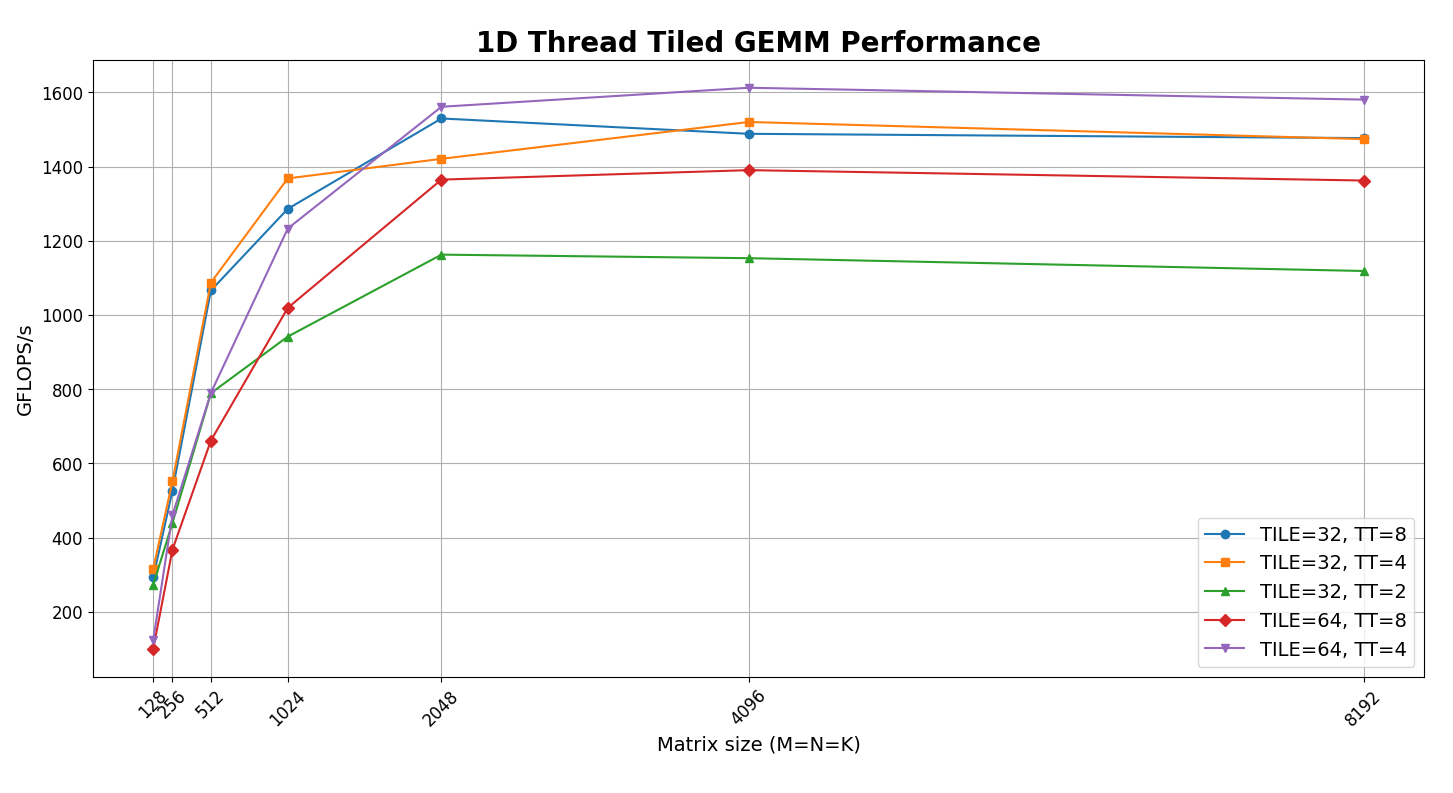
- From the figure we can see best performance for TILE_SIZE=64, THREAD_TILE=4. We will use this for comparison with cuBLAS results.
Kernel 5: 2D Thread Tiling
- Building upon 1D thread tiling, 2D thread tiling allows each thread to compute a small 2D block of output elements instead of a single row segment.
1D Thread Tiling
- Each thread computes multiple elements along one dimension (typically along the row):
Thread:
C[i][j] += A[i][k] * B[k][j]
C[i][j+1] += A[i][k] * B[k][j+1]
C[i][j+2] += A[i][k] * B[k][j+2]
C[i][j+3] += A[i][k] * B[k][j+3]
2D Thread Tiling
- Each thread now computes a 2×2 tile of the output matrix:
Thread:
C[i    ][j    ] += A[i    ][k] * B[k][j    ]
C[i    ][j + 1] += A[i    ][k] * B[k][j + 1]
C[i + 1][j    ] += A[i + 1][k] * B[k][j    ]
C[i + 1][j + 1] += A[i + 1][k] * B[k][j + 1]
Each loaded value of A and B is reused multiple times, increasing the amount of computation performed per memory load.
- Kernel implementation is as follows:
__global__ void GEMM_2D_thread_tiled(const float* A, const float* B, float*C, int M, int N, int K, float alpha, float beta){
    int row = threadIdx.y * THREAD_TILE_M + blockIdx.y * TILE_SIZE;
    int col = threadIdx.x * THREAD_TILE_N + blockIdx.x * TILE_SIZE;

    __shared__ float sA[TILE_SIZE][TILE_SIZE + 1];
    __shared__ float sB[TILE_SIZE][TILE_SIZE + 1];

    float temp[THREAD_TILE_M][THREAD_TILE_N];
    for (int i = 0; i < THREAD_TILE_M; i++)
    {
        for(int j = 0;j < THREAD_TILE_N;j++)
        {
            temp[i][j] = 0.0f;
        }
    }
    for(int i = 0; i < (K + TILE_SIZE - 1)/TILE_SIZE; i++){

        // LOAD MATRIX A
        for(int j = 0; j < THREAD_TILE_N; j++){
            for(int k = 0; k < THREAD_TILE_M; k++){
                int sRow = threadIdx.y * THREAD_TILE_M + k;
                int sCol = threadIdx.x * THREAD_TILE_N + j;
                int gRow = blockIdx.y * TILE_SIZE + sRow;
                int gCol = i  * TILE_SIZE + sCol;
                if(gRow < M && gCol < K){
                    sA[sRow][sCol] = A[gRow * K + gCol];
                }
                else{
                    sA[sRow][sCol] = (0.0f);
                }
            }
        }

        // LOAD MATRIX B
        for(int j = 0; j < THREAD_TILE_N; j++)
        {
            for(int k = 0;k < THREAD_TILE_M; k++){
                int sRow = threadIdx.y * THREAD_TILE_M + k;
                int sCol = threadIdx.x * THREAD_TILE_N + j;
                int gRow = i * TILE_SIZE + sRow;
                int gCol = blockIdx.x * TILE_SIZE + sCol;
                if(gRow < K && gCol < N){
                    sB[sRow][sCol] = B[gRow * N + gCol];
                }
                else{
                    sB[sRow][sCol] =(0.0f);
                }
            }
        }

        __syncthreads();

        for(int m = 0;m < TILE_SIZE;m++){
            for(int k = 0; k < THREAD_TILE_M;k++){
                for(int l = 0;l < THREAD_TILE_N;l++){
                    float a_val = (sA[threadIdx.y * THREAD_TILE_M + k][m]);
                    float b_val = (sB[m][threadIdx.x* THREAD_TILE_N + l]);
                    temp[k][l] += a_val * b_val;
                }
            }
        }


        __syncthreads();
    }

    for(int i = 0; i < THREAD_TILE_M; i++){
        for(int j = 0; j < THREAD_TILE_N; j++){
            if(row + i < M && col + j < N)
                C[(row + i)*N + col + j] = alpha * temp[i][j] + beta * C[(row + i) * N + col + j];
        }
    }
}
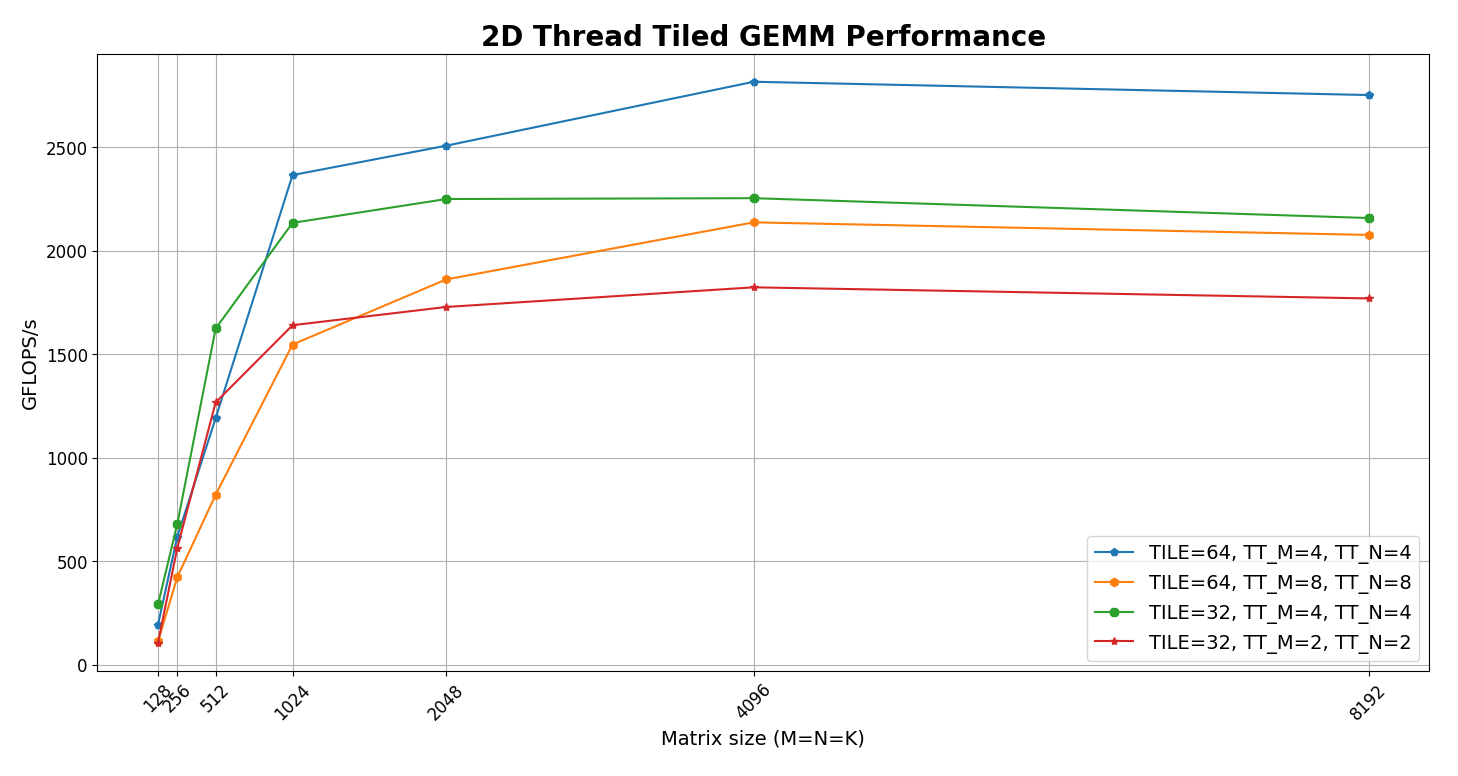
From the figure we can see best performance for TILE_SIZE=64, THREAD_TILE_M=4, THREAD_TILE_N=4. We will use this for comparison with cuBLAS results.
Compared to 1D thread tiling, this approach increases data reuse even further.
- Each thread now computes multiple output elements along both dimensions, allowing loaded shared-memory values to participate in more multiply–accumulate operations.
- This increases arithmetic intensity and improves GPU utilization.
However, increasing the number of outputs per thread also increases register usage, since each thread must store multiple accumulators. This creates a trade-off between higher arithmetic intensity and register pressure, which can impact occupancy.
Benchmark Results
- Results for square matrices
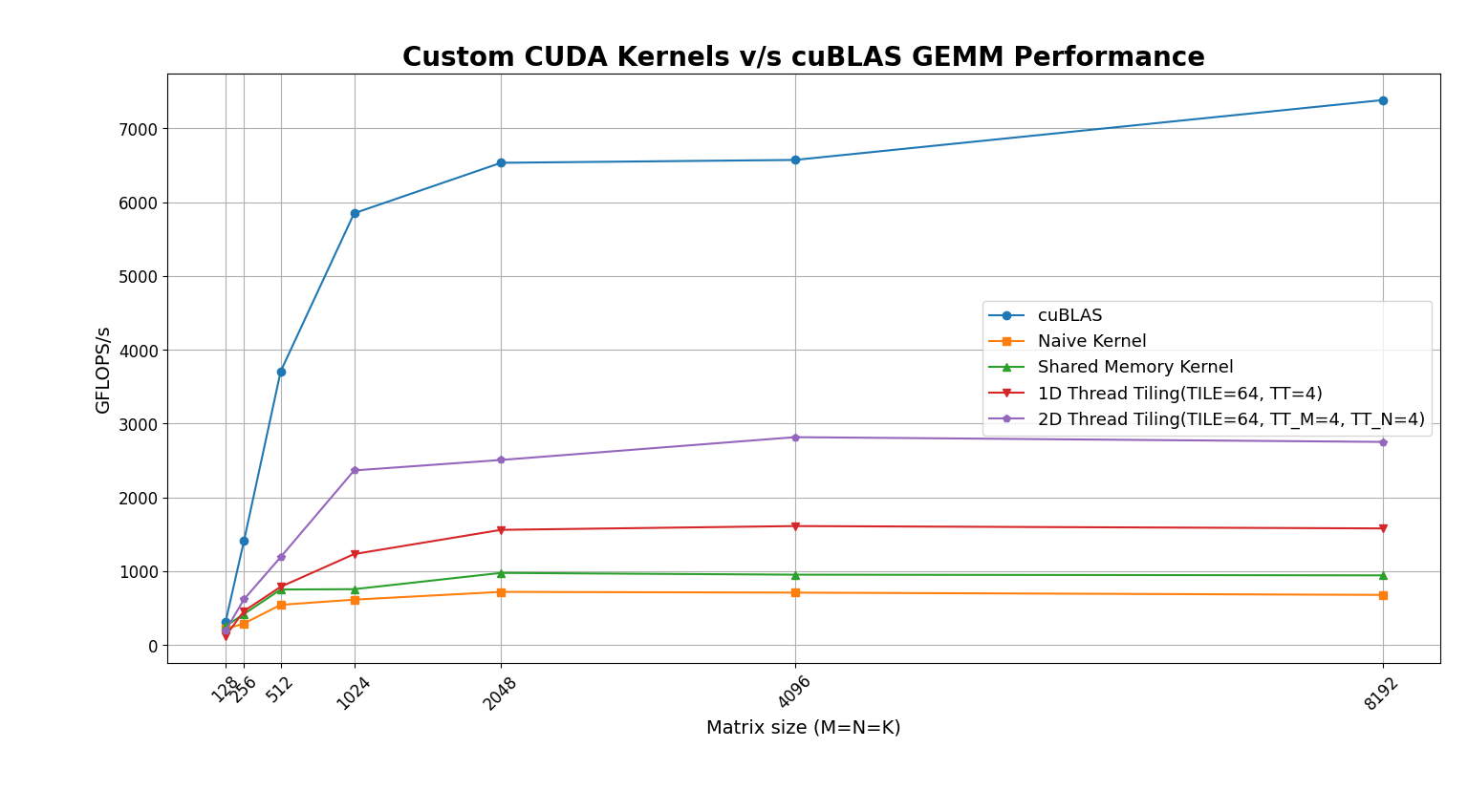
- As observed in the benchmark, 2D thread tiling yields the highest performance, achieving roughly 40% of the throughput of cuBLAS.
Matrix A: 8192 X 4096, Matrix B: 4096 X 8192
| Kernel | GFLOPS/s |
|---|---|
| Naive | 692.4 |
| Shared Memory | 946.5 |
| 1D Thread Tiling(TILE=64, TT=4) | 1583.3 |
| 2D Thread Tiling(TILE=64, TT_M=4, TT_N=4) | 2783.6 |
| cuBLAS | 5538 |
Matrix A: 4096 X 8192, Matrix B: 8192 X 4096
| Kernel | GFLOPS/s |
|---|---|
| Naive | 682.7 |
| Shared Memory | 944 |
| 1D Thread Tiling(TILE=64, TT=4) | 1578.4 |
| 2D Thread Tiling(TILE=64, TT_M=4, TT_N=4) | 2777.5 |
| cuBlas | 7910 |
Work in Progress
I plan to explore vectorized memory loading, warp-level optimizations, and double buffering to try to get close to cuBLAS performance.
Resources and References
- A great insight into CUDA implementation of GEMM to achieve performance comparable to cuBLAS: sibohem article on CUDA MatMul Kernel
- Official Reference: official CUDA Toolkit Programming Guide
- LeetGPU: A great platform to test kernels for numerical verification, allowing to focus on writing kernels instead of debugging memory issues.
Thank you for reading!!